

It's Monday morning after your open day. 120 families came on Saturday. Twelve have already asked questions in your website chat, 80 are waiting for a follow-up email, and one of your admissions officers is on leave this week.That used to mean three days of catching up. Now AI agents in HubSpot can take on much of it: they answer the simple questions, write each family's follow-up email from what they told you at the open day, and brief your team on who needs a call. You decide what each one may do on its own.
Here are the five HubSpot AI agents that matter most for school admissions, what each does and doesn't do, and where to start.
What's the difference between HubSpot's assistant and an agent?
The assistant answers questions when you ask. An agent carries out a task on its own, when something triggers it. Both work from what's in your HubSpot records, so neither is better than your data.
- Breeze Assistant is a chat inside HubSpot. Ask "which families came to Saturday's open day but haven't applied?" and it answers from your records. Chatting with it uses no credits.
- Agents sit in HubSpot's Agent Hub. Each has one job, such as replying to enquiries or following up after an event. Most of the agents below need a Professional or Enterprise subscription (the Data Agent also works on Starter), and they use HubSpot credits each time they work.
Several agents are still in beta, so features and credit charges may change. This guide is correct as of December 2026.
Which five agents matter for a school admissions team?
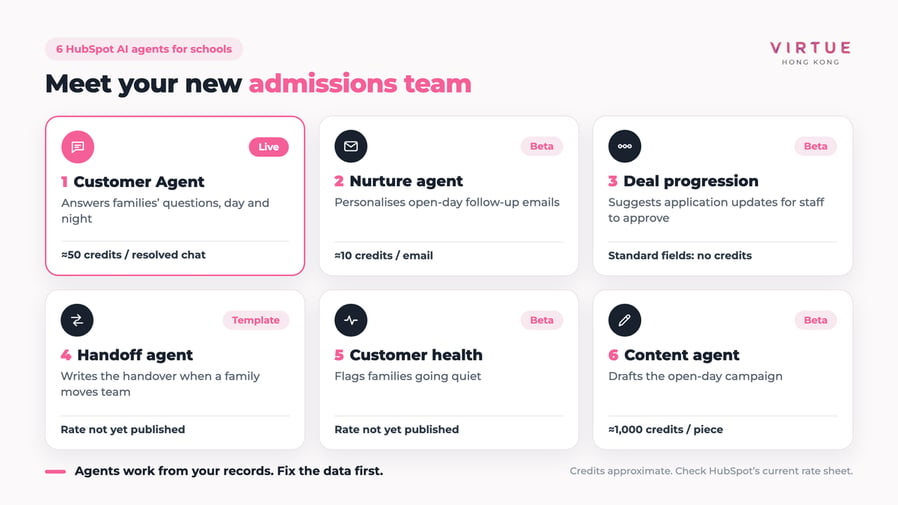
1. Customer Agent: answers families' questions, day and night
What it does: answers questions in your website chat or by email, using your own web pages and documents: fees, year groups, bus routes, admissions dates. When it can't answer, or a family asks for a person, it hands over to your team.
What it doesn't do: offer places, make promises about waiting lists, or know anything you haven't written down.
Status: generally available · Professional or Enterprise of any HubSpot hub, including Marketing Hub · 50 credits per resolved conversation. It works in website chat, email, forms and Facebook Messenger, and on WhatsApp if you have Marketing Hub or Service Hub Professional or Enterprise.
2. Nurture agent: personal follow-up emails
What it does: adjusts each follow-up email to the family. If a parent wrote "she loves robotics" on the open-day form, the email can mention your STEM programme. You can lock fixed details such as dates and fees, and send the personalised version to only a share of families. A report then compares it with your usual email.
What it doesn't do: decide who gets emails, or replace your email plan. It only works on automated marketing emails.
Status: beta · Marketing Hub Pro or Enterprise · 10 credits per personalised email sent.
3. Deal progression: keeps each application up to date
What it does: reads recorded meetings, calls and emails, then suggests updates, such as moving a family from "Visit booked" to "Applied", and the next step. Your officer sees where in the conversation each suggestion came from, and approves or rejects it. HubSpot calls the records "deals"; schools usually rename them "applications".
What it doesn't do: judge a child's fit. An admin can let some fields update without approval; we'd keep approval on anything that matters.
Status: beta · Sales or Service Hub Pro or Enterprise, with a Sales or Service seat · needs meeting transcripts (HubSpot's notetaker). Updating standard fields uses no credits.
4. Data Agent: fills the gaps in family records
What it does: fills in fields your team never got round to. You write one question, such as "Which year group is this family asking about?", and it answers it for each record from the record's details or call transcripts, then saves the answer in a field you can filter and report on. You see a preview before anything is saved.
What it doesn't do: check its own answers or know what was never recorded. Try it on a small sample first: one question for 300 families uses 3,000 credits.
Status: generally available · Starter, Professional or Enterprise of Marketing, Sales, Service, Content or Data Hub (Smart CRM: Professional or Enterprise) · 10 credits per answer (one question, one record).
5. Content agent: drafts the open-day campaign
What it does: with HubSpot's campaign tools, plans an open-day or admissions campaign and drafts the pieces: emails, a landing page and social posts, in your school's voice.
What it doesn't do: know your school's tone without examples, or check facts. Everything needs a human edit.
Status: beta · Marketing Hub Pro or Enterprise · 1,000 credits per piece, the most expensive on this list.
Not on the list: the Prospecting Agent suits large university recruitment teams more than schools. The Social Post agent was retired in July 2026.
How much do these agents cost?
Agents run on HubSpot credits. Starter includes 500 credits a month, Professional 3,000 and Enterprise 5,000, and extra credits cost about USD 10 per 1,000. Unused credits don't carry over, and if you have several hubs you get the largest allowance, not the total.
Rough examples with 3,000 credits:
| Monthly use | Credits |
|---|---|
| 40 enquiries answered by the Customer Agent | about 2,000 |
| 100 personalised open-day follow-ups | about 1,000 |
| Total | about 3,000 |
One content-agent piece would use a third of that on its own. Testing an agent before it goes live uses no credits. Rates change, so check HubSpot's current rate sheet.
Where should a school start?
Start with one agent, on one job, with a person who owns it. Most schools get the quickest results from the Customer Agent or the nurture agent.
- Fix the facts first. Agents answer from your pages and records. Out-of-date fees on your website become out-of-date answers.
- Give each agent an owner who checks its work every week and updates its instructions.
- Keep a person in the loop for anything that commits the school: places, fees, exceptions.
- Test in English and Chinese before going live, with the questions families really ask.
- Check privacy before you start. Agents read children's details on family records. Decide what each one is used for and which content it reads (restricting access to individual sensitive fields needs HubSpot Enterprise), and make sure your privacy notice covers it under Hong Kong's privacy law (PDPO).
Want to see which agent would help your team first?
We'll look at how your admissions team handles enquiries today and suggest the one agent to try first, with a realistic credit budget.
Or start with how families find you: request a free AEO check.